Hosting a Python App
Contents
Hosting a Python application on your Plesk server gives you a robust environment for frameworks like Django, Flask, or FastAPI. You can host your app using Phusion Passenger (integrated directly into the web server) or as a Standalone Service using a reverse proxy.
The application interface is particularly important when choosing a hosting method.
Understanding WSGI and ASGI
WSGI (Web Server Gateway Interface) is the traditional standard for Python web applications. Frameworks such as Flask and traditional Django deployments commonly use it.
ASGI (Asynchronous Server Gateway Interface) is a newer standard that supports asynchronous applications, WebSockets, and long-running connections. FastAPI and Starlette use ASGI.
Not every application server supports both interfaces. For example, the Plesk Python extension uses Passenger to host WSGI applications. ASGI applications such as FastAPI generally require a server such as Uvicorn.
Make sure you choose a hosting method that supports your application's interface.
Before proceeding, ensure your application code is uploaded to your server via SSH, FTP, or the Plesk File Manager into your desired webspace (e.g., /var/www/vhosts/{webspace}/{project name}).
Python dependency manager
Check your project files to determine which Python version and dependency manager the application expects.
| Dependency manager | Project files |
|---|---|
| uv | pyproject.toml, uv.lock |
| Poetry | pyproject.toml, poetry.lock |
| pip | requirements.txt |
Python Versions & Paths
Your Python application may require a specific Python version, defined in its pyproject.toml, .python-version, or other project configuration file.
You can use uv to download and install it directly into your Plesk subscription's webspace. This avoids relying on the operating system's default Python installation.
Install uv
If uv is not already installed, run the following command via SSH:
curl -LsSf https://astral.sh/uv/install.sh | shInstall the required Python version
For example, to install Python 3.12:
uv python install 3.12uv downloads and installs the Python interpreter into its managed directory, typically:
~/.local/share/uv/python/The installation is performed under your subscription system user.
To list Python versions installed and managed by uv, run:
uv python list --only-installed
(you can notice the executable path, e.g. /var/www/vhosts/example.com/.local/share/uv/python/cpython-3.12-linux-x86_64-gnu/bin/python3.12)
Auto Update
We also recommend setting up crons to periodically update python and uv.
You can schedule these tasks using the Scheduled Tasks feature in the Plesk dashboard or by editing the crontab via SSH.
~/.local/bin/uv python upgrade # update to the latest patch (micro version: bugfix/security) release of each installed major.minor version
~/.local/bin/uv self update -q # keep uv up to date
Setting up the Virtual Environment & Dependencies
It is highly recommended to isolate your application's dependencies using a virtual environment. Access your server via SSH, navigate to your application directory, and set up your environment based on your preferred package manager.
Uploading pyproject.toml and uv.lock files along with your application code ensures consistency between the environements.
Using uv (Fast package manager)
If your project uses uv as its dependency manager and has a pyproject.toml file, run:
uv -v sync --managed-python --lockedThis creates the project's virtual environment (by default, .venv) and installs the dependencies specified in the pyproject.toml file.
We recommend including the uv.lock file when uploading your project. This ensures the same dependency versions are installed as the ones used during local development. uv sync --locked will install your dependencies.
Activate the environment:
source .venv/bin/activateUsing Poetry
If your project uses Poetry to manage dependencies, you can still use uv to create the virtual environment and install the dependencies recorded in the Poetry lock file.
First, create the virtual environment:
uv venvThen install the dependencies from the Poetry lock file:
uv pip install poetry
poetry export -f pylock.toml --output pylock.toml
uv pip install -r pylock.toml
The poetry export command requires Poetry's export plugin. If it is not installed, add it with:
poetry self add poetry-plugin-exportActivate the environment:
source .venv/bin/activateUsing standard pip (requirements.txt)
If your project uses a traditional requirements.txt file, uv can act as a faster replacement for pip.
Create the virtual environment:
uv venvInstall the dependencies:
uv pip install -r pylock.tomlActivate the environment:
source .venv/bin/activateChoosing Your Hosting Method
You can serve your application using one of the three methods:
Passenger_WSGI
Plesk provides a convenient interface to manage Python applications.
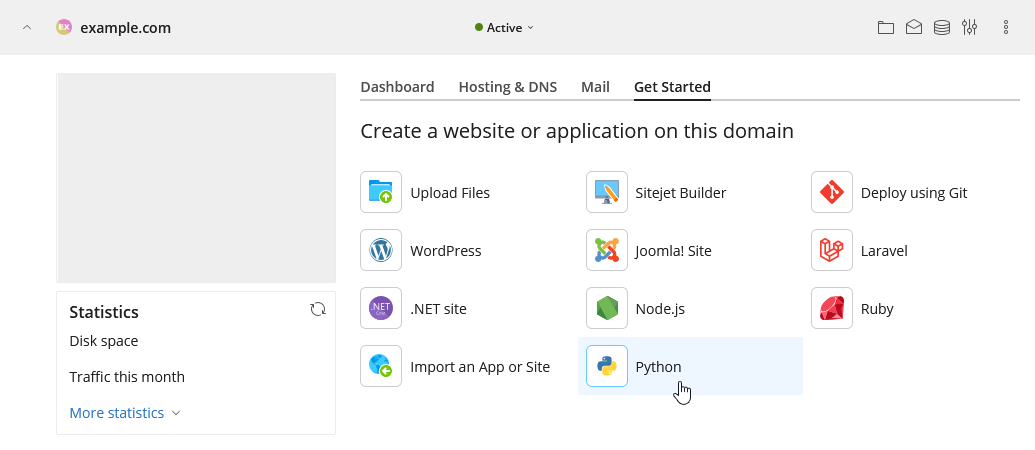
Upload your application to a folder in the webspace (e.g. /app), open the domain card, go to Get Started - Python
Scan (it will search the website webspace for Python application folders) or set the Application root and Document root then click on Enable Python
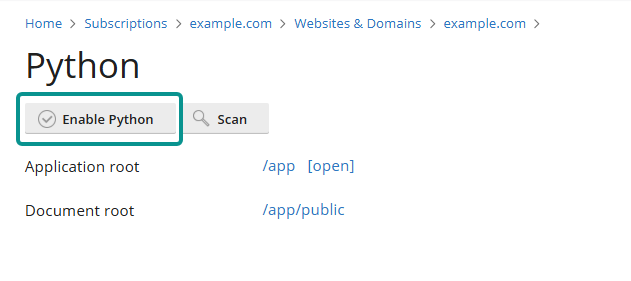
- Application root: The application directory within the website’s webspace (e.g. /app)
- Document root: The public directory inside the application folder (e.g. /app/public)
The Document Root option will change the Document root value in the website Hostting Settings, usually httpdocs/, to the specified value
Plesk will then scan the application, set up the virtual environment, install dependencies, and start the app. The extension also lets you view and edit configuration files, set the Python version, manage environment variables and secrets.
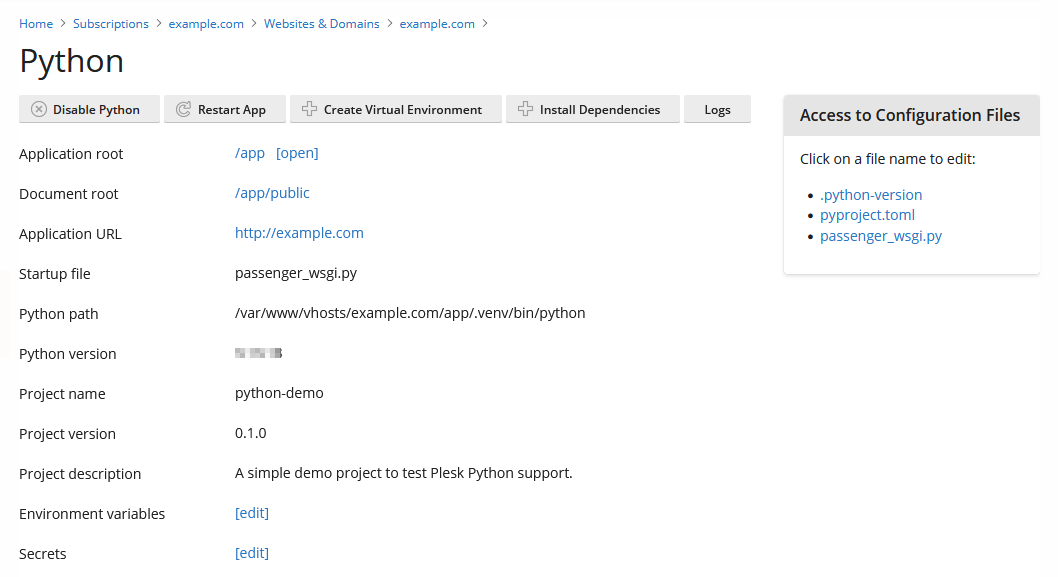
The install dependencies button performs a uv sync if a uv.lock is detected, or else pip install -r requirements.txt. You may wish to use a different command to resolve your dependencies via SSH instead (e.g. uv sync --locked to ensure that your uv.lock is not rewritten, or resolving your dependencies from a pylock.toml / via a different dependency management tool)
Standalone Service (ASGI) & Reverse Proxy
If you are using an async framework (like FastAPI), you must run your app as a standalone service and proxy the requests to it with a reverse proxy like Nginx. Because root access shouldn't be required to run the application, you should bind your app to a Unix Socket in the application root folder and use a Scheduled Task (Cron) to keep it alive.
Add your application server to your project's dependencies on your local development machine using uv add gunicorn or uv add uvicorn, respectively. Uploading pyproject.toml and uv.lock files along with your application code ensures consistency between the environements.
Step 1: Test the App Server
Using Gunicorn (for Django/Flask):
gunicorn app:application --bind unix:/var/www/vhosts/example.com/app/app.sockUsing Uvicorn (for FastAPI):
uvicorn app:main --uds /var/www/vhosts/example.com/app/app.sockStep 2: Keep the App Alive with Supervisord
If the server reboots or your app crashes, you need it to restart automatically. We recommend using Supervisord (detailed instructions on how to install it here)
Following the article above, after installing supervisord, you should create a configuration file for you application, for example:
~/.local/etc/supervisor.d/python-app.ini
Add the following configuration:
[program:python_app]
command=/var/www/vhosts/example.com/app/venv/bin/gunicorn app:application --bind unix:/var/www/vhosts/example.com/app/app.sock
directory=/var/www/vhosts/example.com/app
user=example.com
autostart=true
autorestart=true
redirect_stderr=true
stdout_logfile=/var/www/vhosts/example.com/logs/app.log
Replace the paths and system user with your own values.
Reload Supervisord after saving the configuration!
Step 3: Configure the Nginx ProxyPass
Now, tell Nginx to forward web traffic to your local port. In Plesk, go to your domain's Apache & nginx Settings. Uncheck "Proxy mode" to disable Apache, and add this to Additional nginx directives:
location / {
    proxy_pass http://unix:/var/www/vhosts/example.com/app/app.sock;
    proxy_set_header Host $host;
    proxy_set_header X-Real-IP $remote_addr;
    proxy_set_header X-Forwarded-For $proxy_add_x_forwarded_for;
    proxy_set_header X-Forwarded-Proto $scheme;
}
Log Rotation
To prevent your application logs from growing indefinitely and consuming your webspace disk quota, you must configure log rotation.
Without root access, there are two completely self-service approaches to handle this:
Use a Custom Logrotate Config & Cron Job (Recommended)
You can run the server's native log rotation tool entirely from within your own webspace.
1. Create the configuration file
Inside your application directory, create a file named logrotate.conf (e.g., /var/www/vhosts/example.com/app/logrotate.conf) and paste the following:
/var/www/vhosts/example.com/logs/app*.log {
    daily
    rotate 14
    compress
    missingok
    notifempty
}
(This ensures your logs are rotated daily, compressed to save space, and kept for 14 days).
- Automate it with a Scheduled Task Logrotate needs to be triggered daily to check the files. In Plesk, go to Scheduled Tasks and click Add Task.
Task type: Run a command Command: Paste the following line.
/usr/sbin/logrotate -s /var/www/vhosts/example.com/app/logrotate.status /var/www/vhosts/example.com/app/logrotate.confRun: Daily (e.g., 0 0 * to run at midnight)
Click OK to save.
Handle logs inside your Python code
Alternatively, instead of writing to a single massive log file, you can use Python's built-in RotatingFileHandler directly inside your app.
Here is a basic example to implement in your code:
import logging
from logging.handlers import RotatingFileHandler

# Keeps 14 backups, max 5MB each
handler = RotatingFileHandler('/var/www/vhosts/[example.com/logs/app.log](https://example.com/logs/app.log)', maxBytes=5000000, backupCount=14)
logger = logging.getLogger(__name__)
logger.setLevel(logging.INFO)
logger.addHandler(handler)
This logging configuration is intended to manage only app.log and its automatically rotated backup files. All other log files must remain untouched.
Updating and Maintaining Your Application
Deploying an application is not a one-time task. Whenever you release a new version, you may need to update the application code, dependencies, configuration, and database schema.
The exact steps depend on your framework and deployment method.
Update the application code:
Upload the latest application files to the server via SSH, FTP, or the Plesk File Manager into your desired webspace.
Update dependencies:
If your application dependencies have changed, update the virtual environment.
For uv:
uv sync --managed-python --lockedFor Poetry:
uv venv --managed-python --clear && uv pip sync --strict pylock.tomlFor pip:
uv venv --managed-python --clear && uv pip sync --strict requirements.txtAlways deploy the appropriate lock file alongside your application code so that the installed dependencies match the intended project versions.
Restart the application
After updating the code and dependencies, restart the application so that the running process loads the latest version.
Passenger_WSGI: Use the Restart App button in the Plesk Dashboard - Python
 Supervisord: Restart the relevant program using supervisorctl, while connected via SSH.
supervisorctl restart python_app